
COM4011 Introduction to Programming Assignment Sample
Examine Java-based stock control principles including user input validation, inventory tracking, sales handling, and reorder list generation.

- Introduction: Computerized Stock Control System in Java
- Task 1: Menu Design and Input Validation
- 1.1 Flowchart
- 1.2 Pseudocode
- 1.3 Explanation of Input Validation and Data Types
- 1.4 Java Program Description
- 1.5 Testing and Screenshots
- Task 2: Stock Data Management and Cost Calculation
- 2.1 Flowchart
- 2.2 Pseudocode
- 2.3 Explanation of Input Validation and Data Types
- 2.4 Java Program Description
- 2.5 Testing and Screenshots
- Task 3: Sales Processing and Reorder Level Generation
- 3.1 Flowchart
- 3.2 Pseudocode
- 3.3 Explanation of Input Validation and Data Types
- 3.4 Java Program Description
- 3.5 Testing and Screenshots
- Type Assignment
- Downloads2550
- Pages13
- Words3160
Introduction: Computerized Stock Control System in Java
This project is aimed at creating a computerized stock control system with features such as user input validation, stock update, sales, and auto-reorder level in Java. The system aims at aiding the buna business in recording the level of stocks, finding out the total cost of the products, selling the products, and coming up with a list of products that need restocking, once the existing stock reaches a certain level. For guidance similar to help with assignment uk service, the three major activities in the project include feeding the existing stock details, inputting the business sales details and producing the reorder lists. Regarding the first task it is necessary to underline the creation of a menu-driven program that lets the users choose certain operations. The second task aims at creating the StockData method that encompasses data concerning items consisting of stock quantities, cost price, price, threshold quantities, and reorder quantities. The total cost of stock is then also determined afterwards. Accomplished in Task 3 is the SalesData method that increases the stock level position after selling and checks if the fresh supplies should be ordered.
Task 1: Menu Design and Input Validation
Task 1 focuses on establishing the foundation of the stock control system by designing a menu-driven program. This task ensures that users can navigate the system easily while enforcing strict input validation to prevent incorrect selections. It introduces core programming concepts such as loops, conditional statements, and user interaction, which are essential for controlling program flow.
1.1 Flowchart
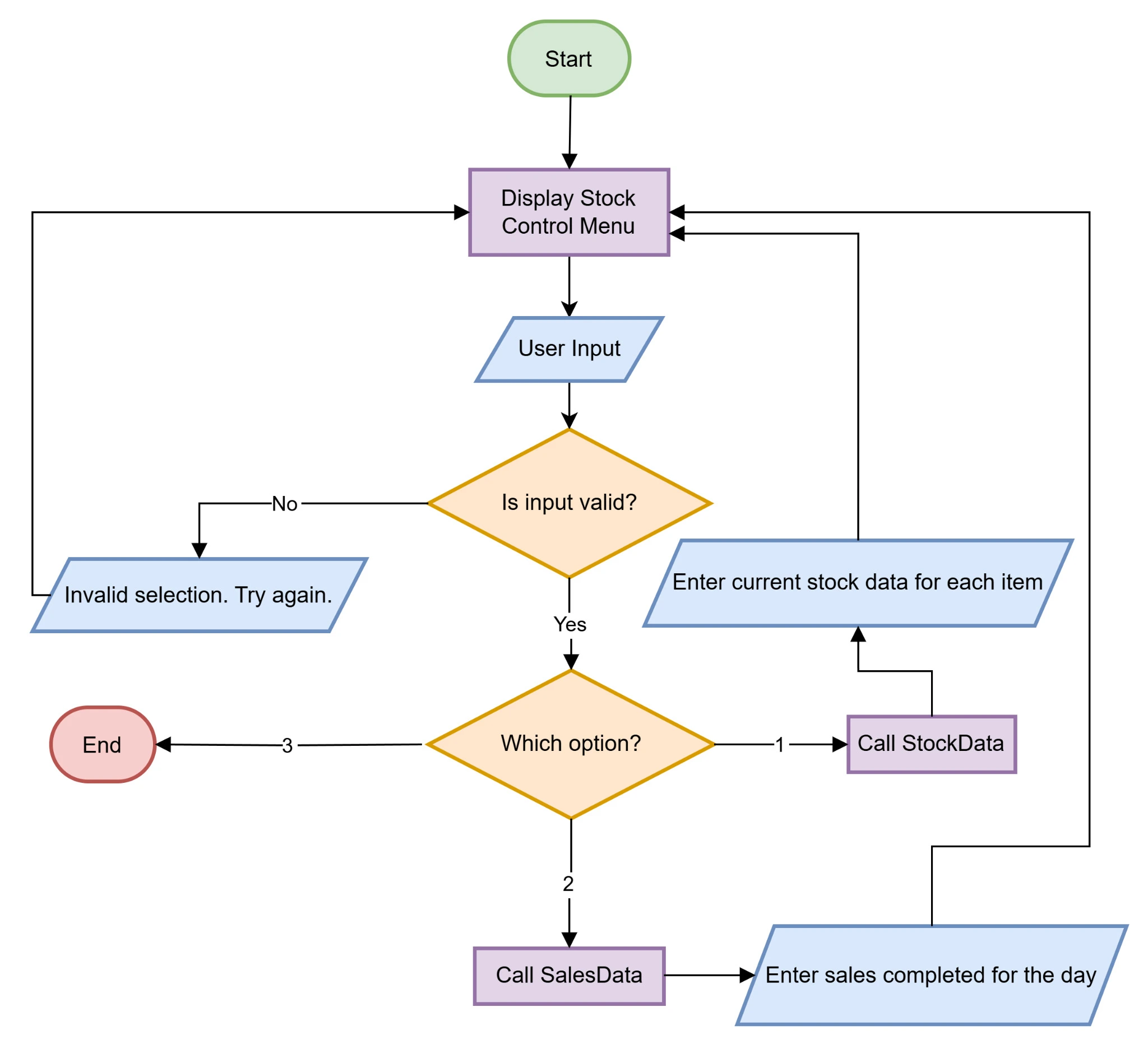
Figure 1: Flowchart based on the task 1 requirements
The flowchart of task 1 designed as follows illustrates the pattern of the actual stock control system.
1.2 Pseudocode
BEGIN
DISPLAY "Stock Control Menu"
DISPLAY "1. Enter stock data"
DISPLAY "2. Enter sales data"
DISPLAY "3. Exit"
DISPLAY "Select an option: "
WHILE true DO
IF input is not an integer THEN
DISPLAY "Invalid input! Please enter a number (1-3)."
CONTINUE LOOP
SET choice = user input
SWITCH choice DO
CASE 1:
CALL StockData()
CASE 2:
CALL SalesData()
CASE 3:
DISPLAY "Exiting program..."
EXIT PROGRAM
DEFAULT:
DISPLAY "Invalid choice! Please select 1, 2, or 3."
END SWITCH
END WHILE
END
1.3 Explanation of Input Validation and Data Types
One component of the program is the input validation where the user will only enter appropriate input so that errors arising therefrom will not interrupt the program flow. In the menu selection the user is supposed to enter an integer of his preferred choice which should range between one and three only. This approach aligns with the learning outcomes of COM4011 Introduction to Programming, where emphasis is placed on handling incorrect inputs effectively. In case of an incorrect input that is not an integer value, an error message is provided and the unwanted entry is deleted. The program also includes an instruction for the user to enter another valid choice once they enter an invalid one. It helps avoid the system failure as a result of inadequate and improper input. Furthermore, when the user inputs an integer that is not within the acceptable range, the program displays an invalid selection input message and waits for the selection again. Validation restricts the following of only the correct menu options so as to avoid any odd behavior from the system.
Main data types employed in the program include integer and string type. The menu selection variable is of type integer because the options can only be identified by their numeric value. For the purpose of accepting the input at the runtime from the user, there is a class known as Scanner in Java and it is widely used. The strings are employed for providing messages and instructions to the client or user of the system. In this way, correctness of data types used allows the program to remain stable and run with no issues. The Scanner object is essential with regard to the input which enables the users to interact with the system. The fact that validation and the subsequent utilization of the correct data formats contribute to the reliability of a program somehow enhances the approach being employed.
1.4 Java Program Description
To enhance user interface, the Java program for Task 1 has been designed considering various reactiveness principles. It starts with a menu containing three choices: entering the stock of the products, entering the sales of the products and the exit option.
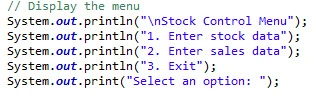
Figure 2: Menu Display
In the case when the user chooses the first option, the corresponding StockData function is invoked. This function at the moment shows a message informing that stock data entry is about to begin. Likewise, in the case where the user chooses the second option, the function named SalesData is invoked, which will show the dialog box informing the users that sales data entry is in progress. These shall be left as stubs for future additions of more functions into the control module necessary of which has not been implemented as yet. Therefore, if the user chooses option 3, the script prints out a message saying that the program is closing and then exits. In the case of an invalid option being inputted, the program alerts the querent and asks for a correct input to avoid processing of undesired inputs.
The development of the switch-case statement in the program ensures that the choices made in the menu are well implemented. According to the option chosen by the user, the right function is invoked. This makes the menu operational until the user chooses to quit by using a loop. This makes the system easy to use as a user can interact with it severally without having to close the program. They make the implementation to provide only the possible selection in order to provide a good interface to the users.
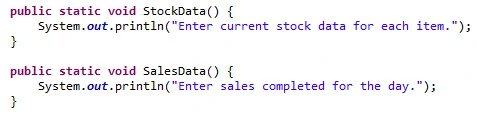
Figure 3: Initial implementation for option 1 and 2
The program has two different functions for the entry of stock and sale records. Described below are the functions of different inputs for stock data and for sale data through the two functions known as StockData and SalesData respectively. Despite the fact that these functions are currently used to display simple messages, the implementation of which defines a structure that will be built on in the subsequent tasks.
1.5 Testing and Screenshots
Testing was carried out to determine the behaviour of the program when faced with different kinds of input from the user. It is seen that both valid and invalid inputs have been incorporated while creating the test cases so as to understand the system’s reaction in both cases.
Table 1: Test cases
| Input | Expected Output |
|---|---|
| 1 | "Enter current stock data for each item." |
| 5 | "Invalid choice! Please select 1, 2, or 3." |
| 2 | "Enter sales completed for the day." |
| a | "Invalid input! Please enter a number (1-3)." |
| 3 | "Exiting program..." (Program stops) |
Based on the testing phase of the program, it is then safe to say that this program is fully functional, and responds appropriately to both valid and invalid input. This means that the implemented validation enhances the proper running of the site tripping at any errors that may occur. Since the program requires the user to input one of the options each time, the program is friendly to the user.
Task 2: Stock Data Management and Cost Calculation
Task 2 extends the system by enabling structured entry and storage of stock data. It emphasizes the use of arrays, appropriate data types, and validation techniques to ensure that stock information is accurate and reliable. This task also introduces cost calculations, allowing the system to determine the total value of available stock effectively.
2.1 Flowchart
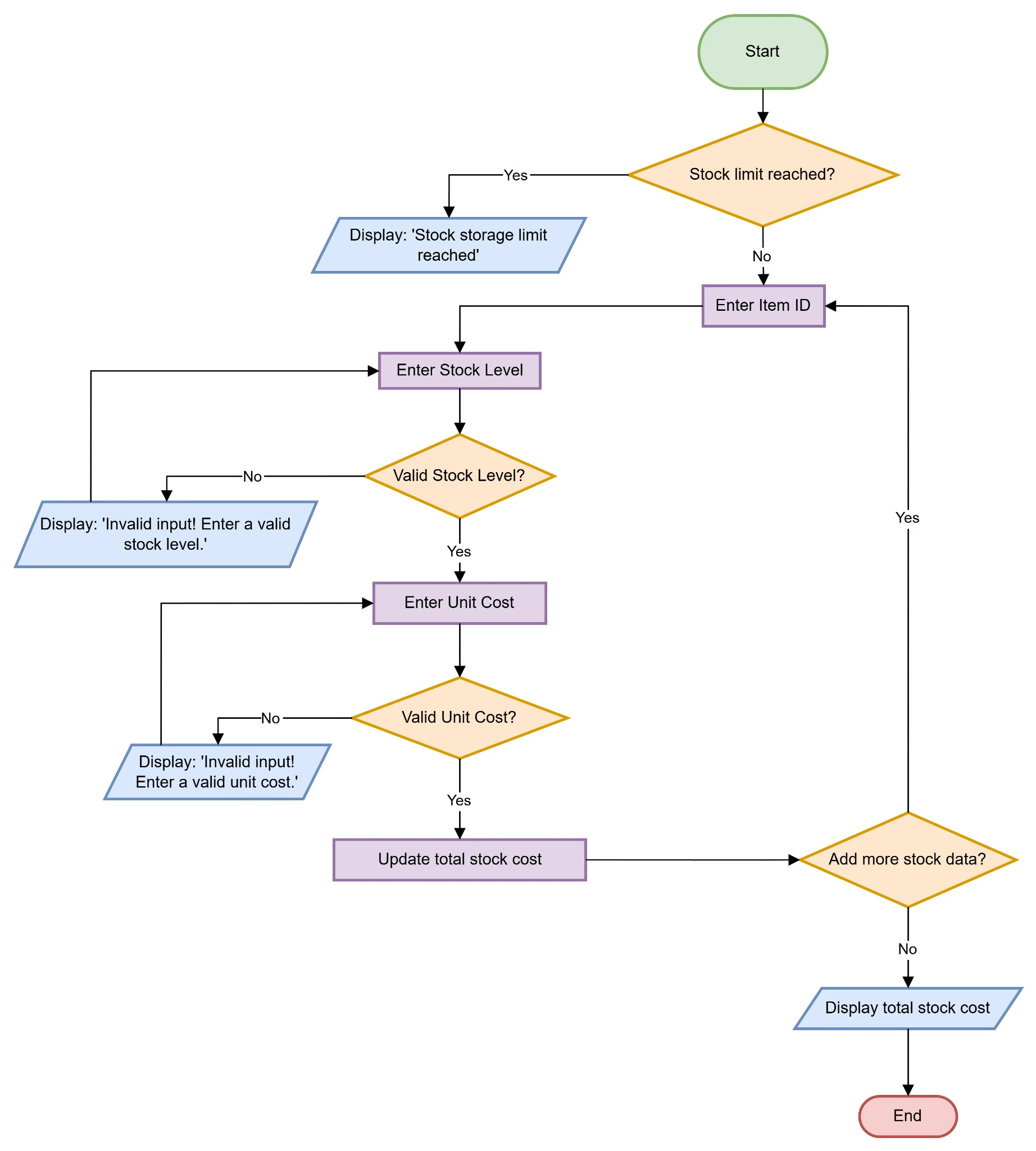
Figure 4: Flowchart based on option 1
The flowchart for Task 2 focuses on the sequence of events within the stock data entry procedure.
2.2 Pseudocode
BEGIN
DECLARE arrays for itemIDs, stockLevels, unitCosts, unitPrices, thresholds, reorderQuantities (size 10 each)
DECLARE stockCount = 0
DECLARE totalStockCost = 0
DECLARE userChoice
DECLARE choice
WHILE true DO
DISPLAY "Stock Control Menu"
DISPLAY "1. Enter stock data"
DISPLAY "2. Enter sales data"
DISPLAY "3. Exit"
INPUT choice
IF choice == 1 THEN
DO
IF stockCount >= 10 THEN
DISPLAY "Stock storage limit reached (10 items). Cannot add more."
BREAK
END IF
DISPLAY "Enter Item ID:"
INPUT itemIDs[stockCount]
REPEAT
DISPLAY "Enter Stock Level (integer):"
INPUT stockLevels[stockCount]
UNTIL stockLevels[stockCount] >= 0
REPEAT
DISPLAY "Enter Unit Cost (decimal):"
INPUT unitCosts[stockCount]
UNTIL unitCosts[stockCount] >= 0
REPEAT
DISPLAY "Enter Unit Price (decimal):"
INPUT unitPrices[stockCount]
UNTIL unitPrices[stockCount] >= 0
REPEAT
DISPLAY "Enter Threshold (integer):"
INPUT thresholds[stockCount]
UNTIL thresholds[stockCount] >= 0
REPEAT
DISPLAY "Enter Reorder Quantity (integer):"
INPUT reorderQuantities[stockCount]
UNTIL reorderQuantities[stockCount] >= 0
totalStockCost = totalStockCost + (stockLevels[stockCount] * unitCosts[stockCount])
stockCount = stockCount + 1
DISPLAY "Do you want to add more stock data? (Y/N):"
INPUT userChoice
WHILE userChoice equals "Y" OR "y"
DISPLAY "The total cost of stock is: ", totalStockCost
ELSE IF choice == 2 THEN
DISPLAY "Enter sales completed for the day."
ELSE IF choice == 3 THEN
DISPLAY "Exiting program..."
BREAK
ELSE
DISPLAY "Invalid choice! Please select 1, 2, or 3."
END IF
END WHILE
END
2.3 Explanation of Input Validation and Data Types
It became evident that input validation is a crucial way of making certain that the type of information entered in the issues associated with stock items is accurate. Within the scope of COM4011 Introduction to Programming, this task reinforces the importance of validating numerical and logical constraints in real-world applications. They are the stock levels, unit costs, gross prices, order points and reorder quantities respectively to be input by the user each time the program is run. In order to help reduce the number of mismatches that a user may input, the system validates the inputs to ensure they match what the program is supposed to accept. The stock level, threshold, and reorder quantity must be whole numbers which should be greater than or equal to zero. If an average value other than a number is entered, including a negative number, an appropriate error message appears on the screen and then the program expects the entry from the user.
For unit cost and unit price, the system checks the validity of the input as a decimal number and having a non-negative value. If, for instance, the user takes time to enter alphabets instead of numbers or a negative input, that specific input will not be accepted by the program. Through these validation rules, the program avoids the entry of wrong data to the system to include accurate stock management.
The data types used in this implementation include integer data and double data. Integer values are appropriate for stock levels, threshold, and quantity revert value since the values cannot be fractional figures. Double data type is used for unit cost and unit price because these values include decimal points in most of the cases. The use of the proper data to the data types makes the calculations to be accurate and makes the system to be stable.
2.4 Java Program Description
Task 2 Java program adopts a form of structured technique in processing and validating inputs from stock data. It starts with checking whether the total storage capacity of stock has been reached. The program does not allow making new entries if they exceed the space that was available in the list for storing the data. If space is present, the program then contains an on-screen message requesting the user to enter item ID then the stock status.
The stock level must be an integer and quantitative, thus the program checks and validates the values that are entered. In case of an invalid input, such a case is handled by an error message, and the user is requested to enter the correct value.
After getting a valid stock level the unit cost code is used and it checks whether it is a non-negative decimal number or not. Similarly, the same validation is done on the unit price, the threshold, and the reorder quantity. On the completion of entering all the correct values, the total stock cost is recalculated depending on the level of stock and cost per unit.
In the last part of the code for each stocked item, the user is prompted whether to continue entering the next stock item or not. This is done so that if the user agrees then the program continues launching the function again, otherwise, the program prints the total stock cost and goes back to the menu.
2.5 Testing and Screenshots
The testing phase was rather aimed at checking whether the program is able to execute all possible valid and invalid stock data inputs correctly. Some of the valid and invalid entries were tried on the program to test the ability of the program to store stock data.
Table 2: Valid Inputs list
| Item ID | Stock Level | Unit Cost | Unit Price | Threshold | Reorder Quantity |
|---|---|---|---|---|---|
| cd5751 | 21 | 2.45 | 4.59 | 20 | 30 |
| bc4dd8 | 22 | 3.25 | 5.99 | 15 | 20 |
| 18b050 | 35 | 1.89 | 2.99 | 18 | 50 |
| c47d16 | 6 | 9.75 | 13.79 | 2 | 5 |
| 6c1af3 | 14 | 5.78 | 8.79 | 10 | 10 |
| abcd01 | 20 | 4.50 | 8.12 | 15 | 20 |
| efgh02 | 15 | 2.99 | 18.55 | 10 | 12 |
| ijkl03 | 30 | 6.25 | 17.01 | 15 | 15 |
| mnop04 | 10 | 3.75 | 13.50 | 5 | 14 |
| qrst05 | 18 | 1.99 | 10.52 | 10 | 20 |
Table 3: Invalid Input Test cases
| Input | Expected Output |
|---|---|
| Non-numeric stock level (abc) | "Invalid input! Enter a valid stock level." |
| Negative stock level (-5) | "Invalid input! Enter a valid stock level." |
| Non-numeric unit cost (xyz) | "Invalid input! Enter a valid unit cost." |
| Negative unit cost (-2.5) | "Invalid input! Enter a valid unit cost." |
These testing confirms that all the stock data including stock level, unit cost, unit price, threshold, and reorder quantity will be validated from input validation.
Task 3: Sales Processing and Reorder Level Generation
Task 3 concentrates on processing sales transactions and maintaining updated stock levels. It allows the system to reduce stock quantities based on sales, calculate total sales value, and identify items that fall below the reorder threshold. This task enhances the system by adding practical decision-making logic through automated reorder list generation.
3.1 Flowchart
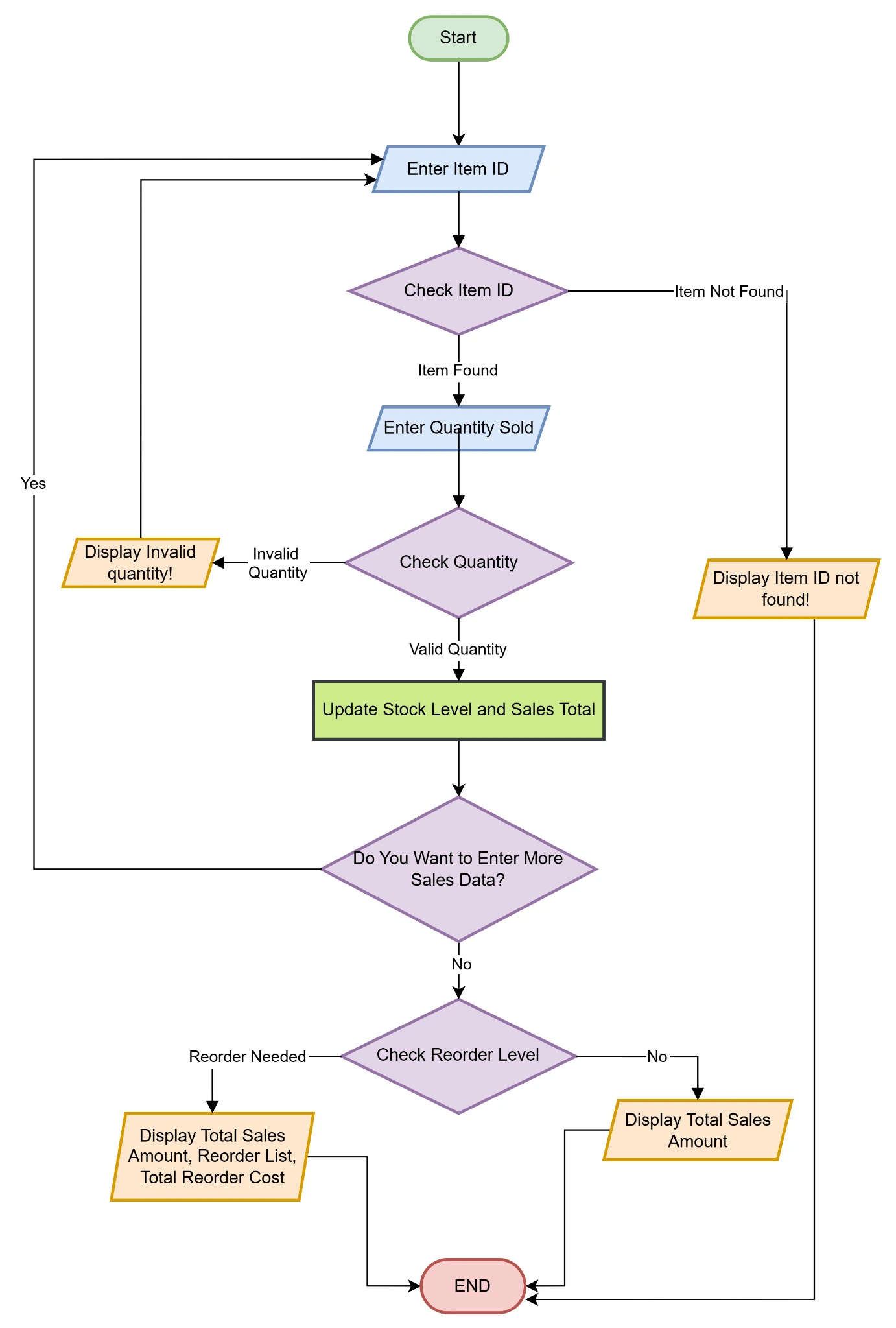
Figure 5: Flowchart based on option 2
The above flowchart illustrates the steps involved in option 2.
3.2 Pseudocode
BEGIN
DECLARE arrays for itemIDs, stockLevels, unitCosts, unitPrices, thresholds, reorderQuantities (size 10 each)
DECLARE stockCount = 0
DECLARE totalStockCost = 0
DECLARE totalSalesAmount = 0
DECLARE reorderNeeded = false
DECLARE userChoice
DISPLAY "Enter sales data for each item:"
REPEAT
DISPLAY "Enter Item ID:"
INPUT itemID
SET index = -1
FOR i = 0 TO stockCount-1 DO
IF itemIDs[i] == itemID THEN
SET index = i
BREAK
END IF
END FOR
IF index == -1 THEN
DISPLAY "Item ID not found!"
CONTINUE
END IF
REPEAT
DISPLAY "Enter Quantity Sold:"
INPUT qtySold
UNTIL qtySold is valid (>= 0 and <= stockLevels[index])
stockLevels[index] = stockLevels[index] - qtySold
totalSalesAmount = totalSalesAmount + (qtySold * unitPrices[index])
IF stockLevels[index] < thresholds[index] THEN
SET reorderNeeded = true
END IF
DISPLAY "Do you want to enter more sales data? (Y/N):"
INPUT userChoice
UNTIL userChoice != "Y" AND userChoice != "y"
DISPLAY "The total sales amount is: ", totalSalesAmount
IF reorderNeeded == true THEN
DISPLAY "Reorder List:"
DISPLAY "Item ID, Current Level, Threshold, Reorder Qty, Unit Cost, Subtotal"
DECLARE totalReorderCost = 0
FOR i = 0 TO stockCount-1 DO
IF stockLevels[i] < thresholds[i] THEN
DECLARE subtotal = reorderQuantities[i] * unitCosts[i]
totalReorderCost = totalReorderCost + subtotal
DISPLAY itemIDs[i], stockLevels[i], thresholds[i], reorderQuantities[i], unitCosts[i], subtotal
END IF
END FOR
DISPLAY "Total reorder cost: ", totalReorderCost
END IF
END
3.3 Explanation of Input Validation and Data Types
In Task 3, input validation plays a vital role in the program’s ability to only accept valid data in the system. This function seeks to check the existence of the item ID in the stock array in order to validate it. In case the effective item ID is not distinguished, then a message is presented to the user to input a valid item ID. In the case of the quantity sold, the user is expected to enter a whole number that is not less than zero and not higher than the stock level. In case the quantity is not valid, the program prompts the user to input a valid quantity.
3.4 Java Program Description
The Java program is fundamentally intended to manage stock data and sales transactions. It prompts the user to either enter stock data or the sales data of the particular stock or exit the program. This structured design reflects key programming concepts taught in COM4011 Introduction to Programming, including modular methods, arrays, and conditional logic.
When the user chooses the “Enter sales data” option the program will ask the user for an ID number. The program then queries the existence of item ID in the stock data array, and comes up with an error message if it does not exist.
Next, the quantity sold is required to be entered by the user. The program ensures that the quantity entered by the user is an integer and it is within the stock availability range. If valid, we decrease the value of the stock level by the quantity that has been sold, and arrive at the value of the total sales by multiplying the unit price of the product with the quantity sold.
When the stock is less than the reordering point, the item is considered for reorder. Once all the sales figures are recorded the program prints out the total sales figures and the reordering list for stocking up on the particular product. The reorder cost in every classification of products is accumulated and also displayed.
3.5 Testing and Screenshots
It is essential to test the program in order to observe its operation and identify various actual conditions which should occur when you use the program. The program was tested on several test cases to get to know if the program has precise function.
Table 4: Invalid Test cases
| Input | Expected Output |
|---|---|
| Invalid item name which is not available | Item ID not found! |
| Invalid quantity which is not available | Invalid input! Enter a positive number within available stock. |
The program also checks the validity of the input and handles both valid and invalid inputs hence has effective data handling mechanisms. The program also has error messages for invalid entries, and valid data entry confirmation which make the stock control as well as the sale management strong.

 6 Years | PhD in Artificial Intelligence
Conclusion
The three tasks outline the provision of a detailed solution towards the stock control as well as the management of sales. In the first task, input validation and proper control of the menu selections were considered. The second task was controlling the stock data input, setting up the valid data types and ranges, and calculation of stock costs. The third task extended the sales processing by adding the data validation of item IDs, quantities, and recomputing the reorder list(s). Testing validates the system in terms of sorting and coping with valid and invalid values for the stock and sales which make it easy to use.
References
- Brown, N.C., Weill-Tessier, P., Sekula, M., Costache, A.L. and Kölling, M., 2022. Novice use of the Java programming language. ACM Transactions on Computing Education, 23(1), pp.1-24.
- GeeksforGeeks, 2016. Arrays in Java. [online] GeeksforGeeks. Available at: https://www.geeksforgeeks.org/arrays-in-java/?ref=lbp [Accessed on: 15 Feb. 2025].
- GeeksforGeeks, 2017. Java Loops. [online] GeeksforGeeks. Available at: https://www.geeksforgeeks.org/loops-in-java/?ref=lbp [Accessed on: 15 Feb. 2025].
- GeeksforGeeks, 2020. Introduction to Java. [online] GeeksforGeeks. Available at: https://www.geeksforgeeks.org/introduction-to-java/ [Accessed on: 15 Feb. 2025].
- Horstmann, C.S., 2024. Core java, volume I: fundamentals. Pearson Education.
- J Eck, D., 2021. Introduction to programming using Java. Hobart and William Smith Colleges.
- Omer, U., Farooq, M.S. and Abid, A., 2021. Introductory programming course: review and future implications. PeerJ Computer Science, 7, p.e647.
- Sharopova, M., 2024. JAVA PROGRAMMING IN THE LANGUAGE FLOWING INPUT AND RELEASE. Solution of social problems in management and economy, 3(1), pp.84-93.
- Vyas, B., 2023. Java-Powered AI: Implementing Intelligent Systems with Code. Journal of Science & Technology, 4(6), pp.1-12.
- W3schools.com, 2025. Java Do/While Loop. [online] Available at: https://www.w3schools.com/java/java_while_loop_do.asp [Accessed on: 15 Feb. 2025].
- W3schools.com, 2025. Java Switch. [online] Available at: https://www.w3schools.com/java/java_switch.asp [Accessed on: 15 Feb. 2025].
Recently Downloaded Samples by Customers
Introduction to Strategic Marketing Assignment Strategic management is the proves that set the goals, process objectives in...View and Download
Choice of topic Looking for expert assistance with pressure ulcer prevention? Our Online Assignment Help offers...View and Download
Professionalism Professionalism refers to the practice of standards of the code of ethics, being accountable, and striving...View and Download
1. Introduction: AI & ML in Structural Engineering Get in-depth insights on AI-driven structural engineering with Customized...View and Download
Introduction Academic challenges got you down? Turn to Rapid Assignment Help for reliable, professional assistance. We make sure...View and Download
Introduction Discover expert reflections on growth with this sample. With Assignment Help UK, develop tailored insights for...View and Download