
KV6017 Enterprise Networks and Security Assignment Sample
Evaluate the secure design, configuration decisions, and multi-site connectivity approach using practical routing models and detailed testing, troubleshooting, and validation strategies.

- Type Assignment
- Downloads2082
- Pages17
- Words4245
Part A
Part A presents the overall network design and explains why each connection, configuration, and addressing method was chosen. It highlights how secure links, routing methods, and segmentation support proper communication among locations. The section also includes router configurations, and it concludes by discussing testing procedures used to validate connectivity and correct system performance.
1. Introduction
This paper aims to present network design and configuration of the Head Office network and other branches according to the specification. In a general context, it is responsible for the protection and reliable transmission and connection of network data flow, functionality, reliability and growth and and such topics are often explored in assignment help service through guided explanations. The report also describes the decisions for each network requirement such as MPLS VPN, IPSec, and direct secure links between departments. Further, one will learn about how the routers have been configured, the adopted IP addressing and also the ways used in testing and troubleshooting in order to enhance the network implementation.
2. Section 1: Network Decisions and Justifications
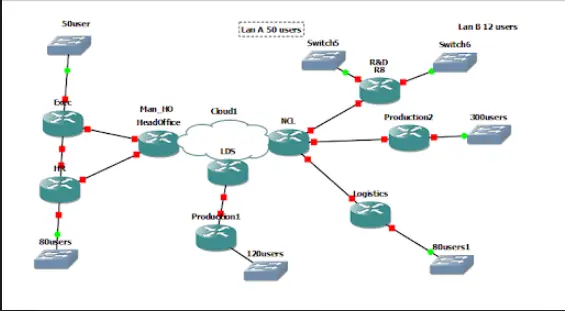
Figure 1: Network Making Part A
Secure Ethernet Link (EXEC-HR)
To ensure that there is direct Ethernet connectivity between the EXEC and HR departments in the Head Office (MAN_HO), a VLANs solution depending on 802.1X will be used to create an encrypted VLAN for the direct transfer of data. This method also makes it possible for only those devise that are permitted , to have access to the link, thereby increasing security. The information being exchanged is very personal and as such there is need to ensure that the message exchanged is coded to avoid third party interception (Jnr et al.2024). EXEC and HR will be provided a separate VLAN to analyze the traffic, and to prevent unauthorized access to the link, port security features will be set to allow only the specified MAC address. In modern Enterprise Networks and Security environments, this ensures greater confidentiality and isolation between sensitive departments.
Full Mesh MPLS VPN (HR, LDS, NCL)
The Full Mesh MPLS VPN will connect the MAN_HO HR, LDS PRODUCTION 1 and NCL LOGISTICS site to provide the optimum connectivity between different sites. MPLS has all the features pertinent in creating a scalable efficient and secure virtual private network that has a low latency. Each site will be interconnected through provider edge (PE) routers, while protocols such as OSPF will permit dynamic discovery of routing and traffic. The full mesh topology imply that there is redundant connection and available ones remain active if others fail creating high availability and fault tolerance. MPLS VPNs also provide better security; traffic separation than traditional VPNs.
MPLS + IPSec (EXEC-NCL R&D LAN A)
To further enhance the security of the MPLS VPN link between MAN_HO EXEC and NCL R&D LAN A, data confidentiality and integrity IPSec (Internet Protocol Security) will be used. IPSec comes in handy when it comes to the transmission of data and this is especially an added advantage in large distance connections. Since the link between the EXEC and R & D LAN A will be dealing with sensitive low priority data then using IPSec will provide adequate security for the data in transit without complicating the network and thus slowing its performance. AH and the ESP of IPSec will be employed for ensuring both the data-origin authentication as well as the confidentiality of data that traverses over the MPLS network.
SQL Server Placement (MAN_HO HR)
For the placement of the internal SQL server serving the MAN_HO HR LAN, two possible locations have been considered: LDS PRODUCTION 1 LAN or NCL LOGISTICS LAN to be more precise. Considering the results of performance modeling, preference should be given to connecting MAN_HO to NCL via 100 Mbps bandwidth where the distance is 220 km. This placement also decreases latency whereas increases the speed for the users of HR. This follows common Enterprise Networks and Security principles where application servers should be placed close to the consuming users for improved performance and reduced attack exposure. Moreover, measures such as IP filtering will guarantee that only the authorized HR LAN users can access the SQL server so as to access the data optimally for the organization and its employees safely.
Access Control (NCL PRODUCTION 2)
To restrict users on the NCL PRODUCTION 2 LAN from gaining access to the MAN_HO EXEC LAN, then proper routers will have to be configured with ACLs. These ACLs will prevent traffic from the PRODUCTION 2 LAN to the EXEC LAN while permitting all other needed traffic within the NCL network. The ACL will be set on the inbound traffic, it will filter out any unauthorized request from reaching the EXEC LAN. With the help of the shielded environment of the EXEC LAN from extraneous network connections, excess threats to the security of the network decrease, and the data portion of MAN_HO EXEC remains secure.
IP Addressing & DHCP Configuration
| Department/LAN | Subnet | Subnet Mask | DHCP Range | Excluded IPs |
|---|---|---|---|---|
| MAN_HO HR | 192.168.2.0 | 255.255.255.128 | 192.168.2.10-192.168.2.100 | 192.168.2.1-192.168.2.9 |
| LDS PRODUCTION 1 | 192.168.3.0 | 255.255.255.128 | 192.168.3.10-192.168.3.120 | 192.168.3.1-192.168.3.9 |
| NCL PRODUCTION 2 | 192.168.4.0 | 255.255.255.0 | 192.168.4.10-192.168.4.300 | 192.168.4.1-192.168.4.9 |
| NCL R&D LAN A | 192.168.5.0 | 255.255.255.128 | 192.168.5.10-192.168.5.50 | 192.168.5.1-192.168.5.9 |
| NCL R&D LAN B | 192.168.6.0 | 255.255.255.240 | 192.168.6.10-192.168.6.12 | 192.168.6.1-192.168.6.9 |
| NCL LOGISTICS | 192.168.7.0 | 255.255.255.128 | 192.168.7.10-192.168.7.80 | 192.168.7.1-192.168.7.9 |
Table 1: IP table

 6 Years | MSc
A proper IP addressing plan will be developed in order to use up all the available addresses as well as ease expansion of the addressing solution in the network in future. Thanks to the use of the routers, IP addresses will be assigned dynamically by DHCP to the client devices, this will make the IP management easy and minimize errors that may be caused by wrong configuration. The method of addressing will be hierarchical to prevent any conflicts and balances the subnetting between departments. Subnetting will be used to assign the right number of addresses to each LAN depending to the estimated number of devices in the network. DHCP servers will be configured in each router and at the same time, it will be centrally controlled in regard to IP address distribution.
3. Section 2: Router Configurations
Config for Secure Ethernet Link
Regarding the safe connection of the Ethernet link of EXEC and HR VLANs will be configured on the switch to create the secure traffic domains. EXEC and HR will occupy their own VLAN, they will have no connection to other departments. The switch ports will have the port security implemented to unwanted devices connected to the switch ports (Priyadarsini & Bera, 2021). Also 802.1x port security will also be used on the switches to ensure a device is authorized before connecting to the network. On the router, standard protocols, or access control lists (ACLs), will be implemented to filter traffic between these VLANs and allow only communications from the HR and EXEC users over the Ethernet connection.
Config for Full Mesh MPLS VPN
For Full Mesh MPLS VPN, all PE routers at these sites (MAN_HO HR, LDS PRODUCTION 1, and NCL LOGISTICS) should be configured for MPLS. The MPLS VPN will be designed with OSPF being the IGP for exchanging routing information from the various sites. Each PE router will send its internal networks and receive the external routes from the MPLS core network. On each router MPLS specific commands such as mpls ip and mpls label protocol will be used to configure mpls while ip vrf will be used to isolate/segment each site’s VPN traffic.
Config for MPLS + IPSec Link
The MPLS + IPSec configuration between MAN_HO EXEC and NCL R&D LAN A begins with the MPLS VPN configuration with the same commands as that of the full mesh configuration. When MPLS is adjusted on Phase 1, IPSec will be used on the link employing crypto ipsec transform-set and crypto map instructions on the router at MAN_HO EXEC as well as on the router at NCL R&D LAN A. The IPSec will mean specification of Phase 1 (IKE) & Phase 2 (IPSec) attributes such as encryption types – AAP such as AES and Authentication – AAP such as SHA to ensure secure data transfer over MPLS VPN.
Config for SQL Server Placement
The SQL server placement, the router therefore includes static routing or dynamic routing using OSPF to enable the HR LAN to get to the SQL servers that could be located in LDS PRODUCTION 1 or NCL LOGISTICS LAN. ACLs will be designed to allow only HR LAN top access the SQL server while other LANs are barred from accessing the server. IP addressing will be done on the server in the selected LAN and routing done to allow for communication. Also, an entry in the DNS will be made to resolve IP address of the SQL server in the HR LAN conveniently.
Config for Access Control
In order to control connectivity between NCL PRODUCTION 2 and MAN_HO EXEC LAN,_acl will be applied to the routers interfaces and the acl will denied traffic from NCL PRODUCTION 2 LAN to MAN_HO EXEC LAN. The ACL will be applied inbound on router interfaces that connect the NCL PRODUCTION 2 designed LAN to the MPLS cloud. A standard ACL will also block any traffic from PRODUCTION 2 LAN to the EXEC LAN while permitting other required traffic. The configuration will also include the use of logs that would help identify any attempted access violations in case of further studies of the issue.
Config for IP Addressing & DHCP
An IP addressing scheme is to be developed where subnets of each Departments will be created with their own separate LAN address. For each router, the DHCP of the routers will be assigned using the ip dhcp pool command that help allot the IP addresses to clients within the routers specified subnets. The DHCP settings will also address exclusion range to exclude reserved IP addresses for equipment with static IP address and amount of time IP addresses will be leased out. Further, using the ip dhcp excluded-address option it will avoid conflict with reservations given to the devices. Each router will be configured on DCHP relay which directs DHCP request to correct DHCP server as required to maintain correct organization of the addresses within the network.
Get assistance from our PROFESSIONAL ASSIGNMENT WRITERS to receive 100% assured AI-free and high-quality documents on time, ensuring an A+ grade in all subjects.
4. Section 3: Strategy for Implementation, Testing, and Troubleshooting
Implementation Plan
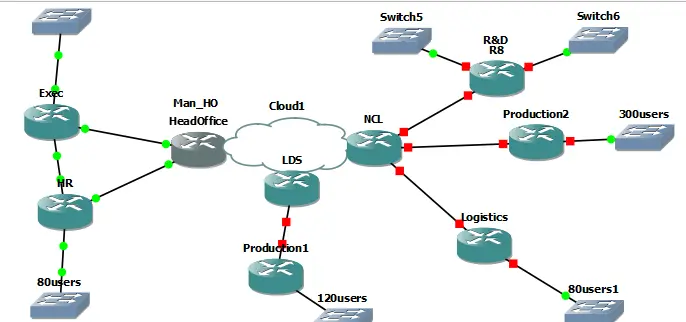
Figure 2: Network topology
The implementation plan will also be done in a structured manner, in phases ensuring the setting of MPLS backbone and check OSPF routing between PE routers next, followed by the creation of VLANs, security settings, ACLs for the secure Ethernet link between EXEC and HR. furthermore performing the full-mesh MPLS VPN between HR, LDS, and NCL, then MPLS IPSec link between MAN_HO EXEC and NCL R&D LAN A. The SQL server will be placed out based on performances that have been determined by some calculation (Donta et al.2022). Last, make additional settings to DHCP servers and apply security restrictions. All the steps will be tested then the next phase will begin.
Testing Strategy
Testing will comprise of two broad categories namely connectivity and functionality for each of the segments configured. In Enterprise Networks and Security operations, validating encrypted tunnels, routing reachability, and access control enforcement is a crucial stage. Start by using simple tests, For example, ping the next router and then use traceroute to verify connectivity with all routers. To DG MPLS VPNs, confirm the Labels by the show mpls ldp neighbors command or view the advertised routes by the show ip route command (Logeshwaran et al.2023). To test IPSec, traffic will be started from the EXEC to the NCL R&D LAN A, then, it will use the command show crypto to verify the status of the tunnel. Check the availability of SQL server from HR LAN using TCP/IP Telnet or ping. DHCP functionality will involve a check on IP address to ensure that this function was correctly implemented.
Troubleshooting Strategy
The problem solving process will start with the process of isolating network segments with such simple commands as ping and traceroute in order to identify connectivity problems. In case of failure of MPLS or IPSec, OSPF should be checked and the tunnel status should be checked by using show ip OSPF neighbor and show crypto IPsec commands (Khalifeh et al.2021). In the procedure of diagnosis ACL or security issues, use Show Access-lists and Show IP interface commands. If SQL server is not reachable then check for routing and properly set ACLs, and correct DNS configuration. DHCP problems will be solved by checking on the DHCP pool parameters and also ensuring the DHCP service is running. Configuration problems will be solved before the new test.
5. Conclusion
The network design and configuration proposed in this report achieves the goals set forth for the company’s network design and configuration goals, regarding security and efficiency. MPLS VPN, IPSec encryption, VLANs, DHCP further strengthen the security, scalability and high performing architecture. The highly specific and specific implementation plan and testing strategy, as well as a clear approach to troubleshooting will ensure safe propagation and the least number of problems. All the configurations are customized to address the functions of various departments within the context of the network and also security. The above solution satisfies the existing requirement while one also has the option to extend and optimize the network in the future.
Part B
Part B focuses on building GRE and IPSec VPN tunnels on GNS3 for secure communication between networks. It explains the addressing plan, steps taken for tunnel creation, and how encrypted links were validated. This section also shows verification outputs and concludes with observations, outcomes, and recommendations based on the simulation results.
Introduction
In this section, a GRE tunnel combined with IPSec encryption is implemented to establish secure communication between remote networks. The focus is on configuring routing, applying security policies, and validating encrypted traffic using simulation tools. This part demonstrates how tunnels protect data, ensure confidentiality, and allow networks to exchange information securely across different sites.
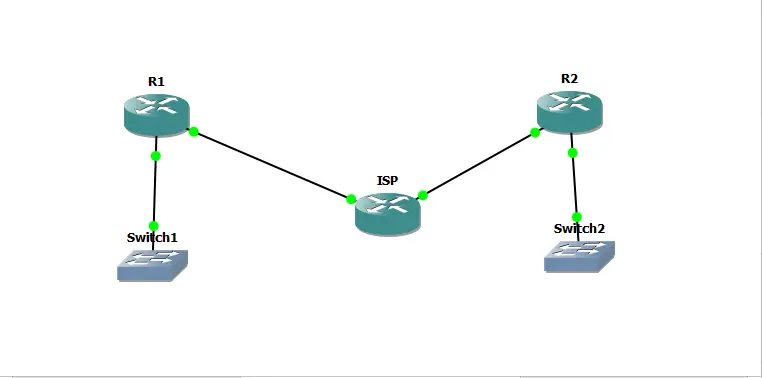
Figure 3: Network Making
This report outlines setup of GRE tunnel that is encrypted using IPSEC between two remote office links namely R1 and R2 which are connected through an insecure public network emulated by an ISP router. The setup was done through GNS3 which is a network emulation platform workstation. The objective of this lab was to configure actual ISP link scenario, build a fundamental GRE VPN over ISP’s network, protect the GRE tunnel by IPSEC and test the connectivity with correct tools.
Objectives
The main goals of this lab were to create a GRE VPN over an ISP network and achieve the following goals: create an ISP link; create GRE VPN on ISP network; secure GRE by IPSEC; understand the stages used in the creation of an IPSEC VPN; and verify connectivity using proper tools. The current ISP router emulated an untrusted public network and R1 and R2 were for remote office connectivity to their ISPs.
Topology
The topology of routers included ISP, R1, and R2 where three routers were used. The ISP router was connected to model an insecure public network while R1 and R2 were connected to model links to two of their ISPs. They included, R1 FastEthernet 0/0 connected to the ISP FastEthernet 0/0, R2 FastEthernet 0/0 connected to the ISP FastEthernet 0/1, R1 FastEthernet 0/1 connected to a switch for LAN and R2 FastEthernet /1 connected to the switch for LAN connectivity (Mach & Becvar, 2022). This was done to ensure that the established links were established over the ISP link in order to create a real world environment where remote offices are connected over the internet.
IP Addressing Scheme
The IP addressing for routers were provided as follows, The ISP router’s FastEthernet0/0 had ip address of 201.6.1.1/30 and the FastEthernet0/1 had an ip address of 201.8.1.1/30. On an ISP router, to provide target for Internet routing, loopback interface was assigned the IP address of 1.1.1.1/8. R1 = FastEthernet0/0 IP address = 192.168.1.2/24 , FastEthernet0/1 = IP address 201.6.1.2/30 Tunnel interface = 10.1.1.1/30 Loopback interface = 2.2.2.2/8. R2 had Fast Ethernet 0/0 – 192.168.2.2/24, fast Ethernet 0/1 – 201.8.1.2/30, Tunnel interface – 10.1.1.2/30 and Loop back interface – 3.3.3.3/8 (Liu et al.2021). This addressing scheme made it possible for every router to possess its raw IPs for its different interfaces so that routing and communication ensued appropriately.
Implementation Steps
The implementation begins with creating the basic network topology and assigning correct IP addresses to all interfaces. After that, a GRE tunnel is configured between the routers to enable end-to-end reachability. Static routes are applied so both networks can communicate through the tunnel. Once basic connectivity is verified, IPSec policies are added to secure the GRE traffic. Finally, testing tools such as ping and traceroute are used to confirm encrypted communication and proper routing.
Implement the Topology
The first thing was to create the topology as has been presented above. These physical connections were done as described in the topology part. The IP addresses were laid upon the particular interfaces of the routers to match with the IP addressing plan. The loopback interface of the ISP router was defined to serve as the internet target (Reddy Yeruva et al.2023). Routes were explicitly set from R1 & R2 to the ISP route to optimize the flow. The basic network functionality was also checked using ping command to test the connectivity between the client networks and the ISP.
Setup a GRE Tunnel
A GRE tunnel was established between R1 and R2 in order to encapsulate the traffic between two remote office links. The tunnel interfaces were enabled with their correct IP addresses and source destination addresses (Song et al.2022). On R1 the tunnel interface was made with the IP address 10.1.1.1/30, source address of 201.6.1.2 and destination address of 201.8.1.2. On R2, tunnel interface was configured with IP address 10.1.1.2/30 source address 201.8.1.2 and destination address 201.6.1.2. Such a design made it possible to confine the traffic flowing between R1 and R2 to the GRE tunnel.
Set Up a Static Route
New static route was defined on each router and was causing traffic to switch between the two LANs to pass through the GRE tunnel. As shown to in R1 below a static route to R2 LAN of 192.168.2.0/24 was configured to go through tunnel interface 10.1.1.2. In R2 STATIC route which points all the traffic meant for R1 LAN range 192.168.1.0/24, over the tunnel interface 10.1.1.1 (Patel, 2024). This made that the traffic between the two LANs pass through the GRE tunnel and take advantage of the encapsulation offered by the tunnel.
Check LAN to LAN Traffic
The LAN to LAN traffic was checked to confirm whether they were using the GRE tunnel. Visits to the ISP’s loopback address indicating Internet connectivity were also analyzed to verify that the tunnel was not used (Khalid et al.2023). The third step proved whether the GRE tunnel was working or not, and if the traffic was transitioning in the right manner. It was possible to establish a usable tunnel that could,inter alia, transport any protocol, including multicast traffic and the GRE tunnel setup was completed.
Check Routes
The routing tables on R1 and R2 were investigated to confirm that there was no issue with the static routes that had been configured. To check the routing tables the command ‘show ip route’ was issued to the switch in order to confirm that the routes were correctly configured (ALRikabi & Hazim, 2022). It also made sure that the routing matrix was precise and check whether the traffic was passing through the GRE tunnel correctly.
Implement IPSEC
To enhance the security over the GRE tunnel, IPSEC was added onto the network. The process included identification of interesting traffic for the VPN, setup of phase one: ISAKMP and phase two: IPSEC. The interesting traffic for the VPN was defined by using access lists. On R1 the access list allowing GRE between the source address 201.6.1.2 and the destination address 201.8.1.2 was created (Mozaffari et al.2021). On R2, an access was created allowing only GRE traffic from the source 201.8.1.2 to the destination address 201.6.1.2.
Phase 1 Configuration
ISAKMP policies and pre-shared keys were used in order to build up a secure channel between two routers R1 and R2. On both routers there was configured ISAKMP policy where encryption was AES, authentication pre-share, hash was SHA and group was 5. To authenticate there was a pre-shared key of ‘KV6017’ (Tang et al.2022). On R1 the pre-shared key was defined for the destination address 201.8.1.2. In R2, the pre-shared key was configured with destination address 201.6.1.2. This designation was in place to make sure that the ISAKMP phase was set and to make the connection secure between the routers possible.
Phase 2 Configuration
GRE tunnel was protected through the usage of two basic configurations: IPSEC transform sets and crypto maps. It was named SOMENAME at both routers and encryption was set to ESP-ALE and hash to ESP-SHA-HMAC. After that, a named crypto map “MAPNAME” was set to use the protocol of IPSEC-ISAKMP and the address of the other router as its peer address. The transform set was set to “SOMENAME,” and the access list to the interesting traffic defined in the step 3. The crypto map was then implemented on the interface which is linked to the ISP in order to help secure the traffic using IPSec.
Test the Tunnel
The routing for the IPSEC tunnel was then checked to confirm that R1 had the ability to route to the 192.168.2.0 network of R2. While working on R1, PING utility was executed with the source address 192.168.2.1 and the destination address of R2 LAN interface which is 192.168.2.2. On R2, the ping option was employed for the purpose of checking the connectivity of the device at the LAN IP address of R1 (Singh & Gill, 2023). Based on the obtained pings the author concluded that the IPSEC tunnel was working properly and the traffic passed through the tunnel as desired.
Verification and Results
It had checked the two routers using ISAKMP SAs and can confirm that the destination and source address were correct and status active. The IPSEC SAs on both routers indicate that the crypto maps where well done and the traffic was being encrypted and decrypted as planned. A detailed examination of the system’s current configuration through the filtering commands gave a confirmation that the IPSEC tunnel had been correctly configured in the system and that traffic was accurately protected under the IPSEC protocol.
Conclusion
The general setting up of the GRE and the creation of the IPSEC VPN on GNS3 was accomplished. Tunnel was created with GRE between the R1 and R2 and the tunnel was encrypted with the help of IPSEC. The connectivity between different remote office links was confirmed and in order to confirm the security of the IPSEC SAs were established. This lab helped in real sense to understand the steps that is needed in order to set an IPSEC VPN and the tools that is required in order to check the connectivity. The execution of this lab shows the competency of the author in terms of VPN technologies and its real world application in securing transferred networks.
Recommendations
Monitoring the IPSEC tunnel recommended on the frequent basis in order to keep the tunnel safe and active. It will be advisable to always save the running configuration using the copy running-config start up-config command to avoid losing some configurations. columns. You can use more commands with the word ‘show crypto’ added to get further information on the IPSEC VPN. This document aims to give the reader clear understanding how the GRE and IPSEC VPN work on GNS3 with details of the configuration process, verification and the outcome. The successful completion of this lab is clear evidence that participants comprehend VPN technologies as well as being able to apply them in real life situations.
References
- Mach, P. and Becvar, Z., 2022. Device-to-device relaying: Optimization, performance perspectives, and open challenges towards 6G networks. IEEE Communications Surveys & Tutorials, 24(3), pp.1336-1393.
- Liu, Q., Sun, S., Rong, B. and Kadoch, M., 2021. Intelligent reflective surface based 6G communications for sustainable energy infrastructure. IEEE Wireless Communications, 28(6), pp.49-55.
- Jnr, O.W.B., Agomuo, O.C. and Muzamal, J.H., 2024, July. Adaptive Multi-Layered Non-Terrestrial Network with Integrated FSO and RF Communications for Enhanced Global Connectivity. In 2024 IEEE/ACIS 27th International Conference on Software Engineering, Artificial Intelligence, Networking and Parallel/Distributed Computing (SNPD) (pp. 263-268). IEEE.
- Priyadarsini, M. and Bera, P., 2021. Software defined networking architecture, traffic management, security, and placement: A survey. Computer Networks, 192, p.108047.
- Donta, P.K., Srirama, S.N., Amgoth, T. and Annavarapu, C.S.R., 2022. Survey on recent advances in IoT application layer protocols and machine learning scope for research directions. Digital Communications and Networks, 8(5), pp.727-744.
- Logeshwaran, J., Shanmugasundaram, N. and Lloret, J., 2023. Energy‐efficient resource allocation model for device‐to‐device communication in 5G wireless personal area networks. International Journal of Communication Systems, 36(13), p.e5524.
- Khalifeh, A., Darabkh, K.A., Khasawneh, A.M., Alqaisieh, I., Salameh, M., AlAbdala, A., Alrubaye, S., Alassaf, A., Al-HajAli, S., Al-Wardat, R. and Bartolini, N., 2021. Wireless sensor networks for smart cities: Network design, implementation and performance evaluation. Electronics, 10(2), p.218.
- Reddy Yeruva, A., Saleh Alomari, E., Rashmi, S., Shrivastava, A., Kathiravan, M. and Chaturvedi, A., 2023. A secure machine learning-based optimal routing in Ad Hoc networks for classifying and predicting vulnerabilities. Cybernetics and Systems, pp.1-12.
- Song, L., Hu, X., Zhang, G., Spachos, P., Plataniotis, K.N. and Wu, H., 2022. Networking systems of AI: On the convergence of computing and communications. IEEE Internet of Things Journal, 9(20), pp.20352-20381.
- Patel, N., 2024. SECURE ACCESS SERVICE EDGE (SASE): EVALUATING THE IMPACT OF CONVEREGED NETWORK SECURITY ARCHITECTURES IN CLOUD COMPUTING. Journal of Emerging Technologies and Innovative Research, 11(3), p.12.
- Khalid, W., Rehman, M.A.U., Van Chien, T., Kaleem, Z., Lee, H. and Yu, H., 2023. Reconfigurable intelligent surface for physical layer security in 6G-IoT: Designs, issues, and advances. IEEE Internet of Things Journal, 11(2), pp.3599-3613.
- ALRikabi, H.T. and Hazim, H.T., 2022. Secure Chaos of 5G Wireless Communication System Based on IOT Applications. International Journal of Online & Biomedical Engineering, 18(12).
- Mozaffari, M., Lin, X. and Hayes, S., 2021. Toward 6G with connected sky: UAVs and beyond. IEEE Communications Magazine, 59(12), pp.74-80.
- Tang, F., Chen, X., Zhao, M. and Kato, N., 2022. The Roadmap of Communication and Networking in 6G for the Metaverse. IEEE Wireless Communications, 30(4), pp.72-81.
- Singh, R. and Gill, S.S., 2023. Edge AI: a survey. Internet of Things and Cyber-Physical Systems, 3, pp.71-92.
Recently Downloaded Samples by Customers
Introduction - Importance Of Choice And Independence In Care Setting Independence and choice in care setting refers to the...View and Download
Introduction The effects of social media on the well-being of Children as now become a worrying consideration of modern society,...View and Download
Introduction to The Impact Of Artificial Intelligence Assignment Artificial Intelligence (AI) is a set of functions that enable...View and Download
Introduction to Creativity For Business Advantage and Growth A cozy, comfortable mattress to sleep on is everything that...View and Download
Introduction: Sustainable Operations Management Get free samples written by our Top-Notch subject experts for taking Online...View and Download
Introduction - TMDIBS109 Understanding the Entrepreneurial Spirit Assignment Sample EcoEssence is a start-up firm whose...View and Download