
PHP Form Handling Project Document Assignment Sample
Study this PHP Form Processing Assignment Sample to explore user input handling, form submission methods, validation techniques and server-side scripting.

- Type Assignment
- Downloads543
- Pages11
- Words2728
1. Introduction to PHP Form Handling Project Document Assignment Sample
This project aims at designing a simple feedback form that users can fill out and submit using HTML and PHP as a means to validate the same. The form has the fields where information regarding the user including name, mode of transport, journey duration, and remarks must be entered. This feedback type is managed by a php script which takes the form data and prints it on the screen. Moreover, the form will contain a Cancel button so that users can use it to cancel their submission so that the form will contain a message that the cancellation was made. The project illustrates the basics of user input through PHP and generating the results as they can appear using the form as a basic starting point of web development through forms. This project is also a good point of departure in the current scenario of beginners in the field of web development, particularly with regard to user input capturing and inputting the same in PHP. The form contains all the vital fields like name, mode of transport, length of travel, and comments and this helps the users to interact with the form without difficulty and send a mail as a feedback. The script that is written in PHP will compare the input with the proper data being so that the data will be processed and show up on the screen correctly. As well, the Cancel button enables the user to abort the form and will not submit any information and show the message on cancellation. The project also brings a part of the form validation, error management and importance of a general ease in user experience, which is the precursor in the complex web application project. By doing this exercise, the users get to know the procedure of dealing with simple form data, the way that clients and servers communicate with each other and use it to build more interactive and dynamic sites in the future.

 5 Years | PhD in Computer Science
Struggling with tight deadlines? Assignment Help For Students from Rapid Assignment Help UK delivers well-researched, expertly written papers on time, every time.
2. Requirements
The survey is devised to receive the opinions of the consumers of the mode of transportation selected. The inputs to be made are the name of the user, the mode of travel, time the user takes during the journey and other comments that the user would like to submit. The structure of the form embraces the following elements:
- User Name: A text input box to which the user should input name.
- Travel Method: A dropdown list with the following choices, Train, Bus, Walk, and Other.
- Journey Time: A dropdown that will enable the user to choose one of the three fixed options: less than a half an hour, between a half an hour and an hour, over an hour.
- Comments: The user should also be provided with a text area where can make any extra remarks or feedback
The form has two buttons labelled with a word submitted. Using the continue button will deliver the data in the form to the php script and the cancel button will abort the form submission process and show a message that the form was canceled. The form makes use of GET method to transfer information to response.php script where the information is done like a processing and output. The PHP script (response.php) should take over the processing of the data that is submitted in the form (as well as the cancel link) (Kersloot et al.2021). The script also verifies which button was tapped; Continue or Cancel, and takes the appropriate actions. In case the Cancel button is clicked, the script is supposed to display a message that the form submission is canceled. This form presented in this project is an outstanding display of basic HTML, PHP and handling of the user input. It displays two buttons as one is labeled Continue and the other one Cancel. When the user clicks on the Continue button, the form data will be sent to the response.php, and the data will be processed on the response.php. When the user clicks on the Cancel button, it prevents the form to be sent and shows the message that cancels the process. Such functionality is handled by the GET method which is a normal form of transferring information into a server. The submitted information is then sent to response.php script by pushing the Continue button where it is taken up by PHP script and stored in the form of a user in the database. The GET superglobal will extract the data in the form (name, mode of transport, journey duration and remarks) in the PHP script (Schmölzer, 2021). The script will then check the entered form data and make sure that all the necessary fields are not left blank, and it can also re-present this data to the user, telling that the form has been filled in successfully. The script moreover verifies which of the buttons is clicked. On clicking the Cancel button, that is, without processing the data, the PHP script will show a message as the form submission has been canceled. The cancellation may be noticed through checking whether the form is filled in using the Continue button or the Cancel button has been pressed. This is a non-complex user interface interaction that enables users on the platform to quickly cancel the process of submission of forms without causing any data processing or data storage, thus, increasing user experience by avoiding unintentional form submissions (Sotnik et al 2023). The programming that is involved in determining which button was pressed is processed in the PHP code. The script will make an use of conditionals to verify the existence of query parameters that points to which of the buttons were pressed. As an example, the form can pass a submit parameter along with its value which the PHP script can check to decide whether the form has been submitted or has been canceled. In the case of clicking on the Cancel button, the script response.php will end the data processing at the current moment and display the message about cancellation (Acharya, 2024). The given approach can be regarded as a perfect method to train the fundamentals of form processing, server-side validations, and conditional PHP scripting. This project is an effective method of addressing the issue of user-friendly web-design by making web pages functional and interactive, in addition, by making both actions (submission or cancellation) have appropriate feedback.
Get assistance from our PROFESSIONAL ASSIGNMENT WRITERS to receive 100% assured AI-free and high-quality documents on time, ensuring an A+ grade in all subjects.
3. Implementation
Step 1: Setting Up the Environment
First of all a local server was created with XAMPP (Apache (the web server) and PHP (the scripting language)). This permitted testing and operating the PHP script in a local machine. It was done by creating the project folder myproject, inside the htdocs directory of XAMPP. To execute the application through the Apache server, in order to enable the application to be reached in the browser, the Apache server was instructed to enable it by starting the XAMPP Control Panel and then the Apache server was opened (Rabheru et al.2022). The Apache server was started using the XAMPP Control Panel to allow the application to be accessed through the browser at http://localhost/myproject/formb.html. XAMPP also comes in handy since it gives a local development environment, fully simulating a web server environment with which the developer can develop and test dynamic web applications, without an internet connection or a live hosting environment. It also gives a secure atmosphere in which one can test the code in a regulated environment, instead of running the change on a live server with all the dangers that that entails (Abdurrahim, 2022). This arrangement works perfectly when they have developers who need to keep their web applications under test to determine their functionality prior to opening them to the public. Through this operation, the developer will have a chance to check and validate their PHP scripts and HTML forms locally and amend them to target any errors and designs, which can be done in a non-hackable area providing an opportunity to upload the application to production only once it is sound.
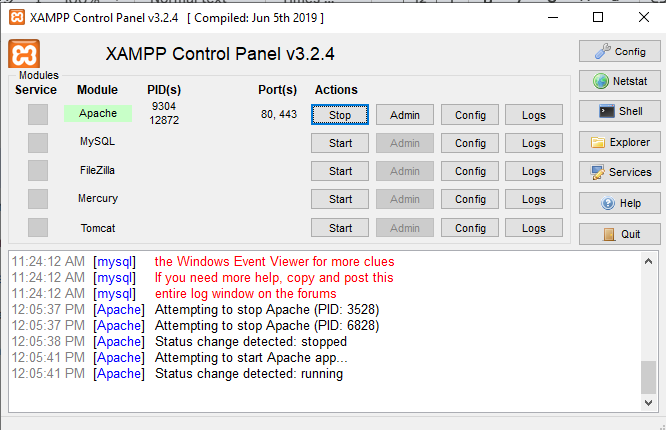
Figure 1: Environment Setup using XAMPP
Step 2: Creating the HTML Form (formb.html)
The form in HTML was designed to obtain the name, mode of travel, time spent in the trip and comments of the user. There was a proper HTML tag assigned to each field e.g., text input in the name field, dropdown of travel and journey time, and text area on the comments field. The form had its data submitted via the GET method and it also had the attribute action as response.php, which tells us that the data will be processed by the response.php script (Rabheru et al.2022). The form also had two submit buttons whose value was labeled as continue and cancel respectively. The HTML form was created in such a way that it would obtain some specific answers of the respondents, such as their name, their way of travelling, the duration of the journey and their comments. Every input field was also provided with a correct HTML tag so that the user could enter information in the structured and easily comprehendible manner. Like in the case of name field a text input field was used and this enabled the user to key in his/her name. The travel system was designed as a dropdown list (<select> tag) so that a user can select one of the predetermined forms of transport such as car, bus, train, etc (Marzele and Jalil, 2025). In the same way, time to journey was addressed using another dropdown field where the user could choose the time he or she took to travel such as less than 30 minutes, 1 hour, and so on. Finally, the comments field was created as a text area tag, in which the user could simply talk about whatever he or she wanted or add more information about his or her experience.
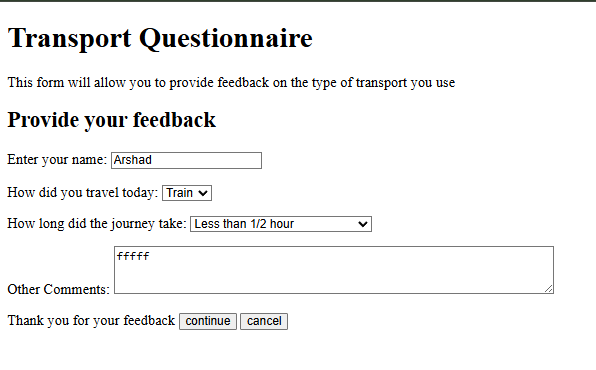
Figure 2: Interface of Web Application
The format of the form provided that the user could complete the obligatory fields and send the information (Gore et al.2021). When it was pressed the cancel button was meant to push back the submission of the form and instead display a cancel message.
Step 3: Creating the PHP Script (response.php)
A PHP script (response.php) was made to respond to the form information. Upon pressing the Continue button, the script then accesses the data entered in the form the $_GET super global array that contains the data as entered through the form. Then the script is made to see what the Cancel button was pressed using the value of $_GET['enterresults'].
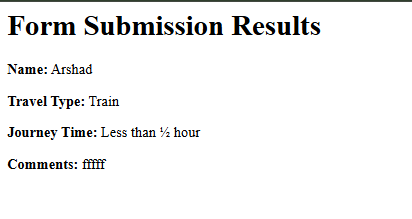
Figure 3: Submission Summary
In case of clicking on the Continue button, the script would present the form data using the function htmlspecialchars() to present the data with the possibility of escaping the special characters to stop the XSS (Cross-Site Scripting) malicious attacks. The $_GET values of the name, type of travel, time of travel, and comments appear in the page giving the user an overview of what was submitted (Over et al.2021). When the Cancel button is pressed a message is displayed stating that the action was canceled and the data of the form is not shown.
Step 4: Testing the Application
The design was exercised to make sure that it functions adequately. When the user clicked the continue button after filling in the information in the form, the PHP program was able to display the information being submitted successfully on the response.php page. Cancel button was also tried to ensure that the message of cancel button pressed was displayed without any form of data being sent (Palčák et al.2022). The testing work was carried out by opening the form through the browser using the URL http://localhost/myproject/formb.html and making sure that the two buttons yield the expected results. The structure of the form has been thoroughly checked so that there is functionality of the form as well as compliance with the requirements of the submission and processing of data in the right manner. The data input by the user was correctly passed to the response.php script when the user clicked on the continue button after filling the Textboxes of the required fields in the form. The information sent by the GET method was displayed properly after being read by the PHP script which showed the information on the response.php page. This was an essential test in checking that the data is being handled well and that there is a smooth interaction between the form and the php script. Conversely, upon clicking the Cancel button, the PHP script was to be programmed to receive this request and present them with a statement like, the form submission was canceled, hence there will be no data passed to the server (Luo, Li, and Meng, 2022). This enabled the user to clear his data without making changes in the system thus delivering a friendly user experience. The testing procedure was accomplished using the URL http://localhost/myproject/formb.html to invoke the form with the help of the browser. It enabled the developer to receive feedback on pressing the button Continue and Cancel to know it works as expected. They were all monitored and checked in the browser so as to establish whether clicking the Continue button sent data to the PHP script correctly and also whether clicking the Cancel button activated the cancellation message. Testing of both buttons gave the correct answers, which guaranteed the functionality of the whole form, and was ready to be refined or to be deployed, as it was stated. Such a cycle of tests is a necessity to make sure that web forms should be user-friendly, reliable and error-free prior to using it in a real environment.
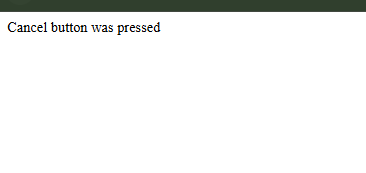
Figure 4: Testing Output
4. Conclusion
This project turns out to be a success in terms of the way to build and handle a form using HTML and the PHP. The form will collect the information about the user preferences of travel and show the results, respectively, upon submission. The functionality of the cancel button was also performed and during this a form can be canceled without posting any information. The user generated form data is manipulated using the channel of the PHP script, which has been created on the basis that the existing risk of security has been reduced to a minimal level corresponding to the effective escape of the user input. Such options as client-side validation, style and the ability of storing data in a database could be also taken into account by us in the future. These would help in increasing functionality and user experience of the form. The project is a solid structure of web form processing and may be expanded in future to possess even more features when needed.
5. References
- Kersloot, M.G., Jacobsen, A., Groenen, K.H., dos Santos Vieira, B., Kaliyaperumal, R., Abu-Hanna, A., Cornet, R., AC‘t Hoen, P., Roos, M., Kool, L.S. and Arts, D.L., 2021. De-novo FAIRification via an Electronic Data Capture system by automated transformation of filled electronic Case Report Forms into machine-readable data. Journal of Biomedical Informatics, 122, p.103897.
- Rabheru, R., Hanif, H. and Maffeis, S., 2022, June. A hybrid graph neural network approach for detecting PHP vulnerabilities. In 2022 IEEE Conference on Dependable and Secure Computing (DSC) (pp. 1-9). IEEE.
- Over, J.S.R., Ritchie, A.C., Kranenburg, C.J., Brown, J.A., Buscombe, D.D., Noble, T., Sherwood, C.R., Warrick, J.A. and Wernette, P.A., 2021. Processing coastal imagery with Agisoft Metashape Professional Edition, version 1.6—Structure from motion workflow documentation (No. 2021-1039). US Geological Survey.
- Palčák, M., Kudela, P., Fandáková, M. and Kordek, J., 2022. Utilization of 3D digital technologies in the documentation of cultural heritage: a case study of the Kunerad Mansion (Slovakia). Applied Sciences, 12(9), p.4376.
- Gore, H., Singh, R.K., Singh, A., Singh, A.P., Shabaz, M., Singh, B.K. and Jagota, V., 2021. Django: Web development simple & fast. Annals of the Romanian Society for Cell Biology, 25(6), pp.4576-4585.
- Schmölzer, H.J., 2021. Development of a multi-layer project management framework for SME's using PHP and SQL.
- Sotnik, S., Manakov, V. and Lyashenko, V., 2023. Overview: PHP and MySQL features for creating modern web projects.
- Acharya, K., 2024. Covid Management System Project Report. Authorea. July 16, 2024. DOI: https://doi. org/10.22541/au. 172116616.60220024/v1.
- Abdurrahim, M.R., 2022. Development Of Website-Based Management Information Systems for Building Construction. Ascarya: Journal of Islamic Science, Culture, and Social Studies, 2(2), pp.116-126.
- Marzele, M.A.U. and Jalil, R.A., 2025. Web-Based UTHM Event Management System. Applied Information Technology And Computer Science, 6(1), pp.1782-1799.
- Luo, C., Li, P. and Meng, W., 2022, November. Tchecker: Precise static inter-procedural analysis for detecting taint-style vulnerabilities in php applications. In Proceedings of the 2022 ACM SIGSAC Conference on Computer and Communications Security (pp. 2175-2188).
Recently Downloaded Samples by Customers
Part 1: Business Analysis and Profit Feasibility This section of "The Practice of Consultancy Assignment Sample" focuses on...View and Download
Introduction The assessment is regarding the prospect of an international business expansion report considering the global...View and Download
Introduction Improve your academic performance with Assignment Helper, covering essential topics like safeguarding, healthcare...View and Download
Introduction Get free samples written by our Top-Notch subject experts for taking online Assignment...View and Download
Introduction to Digital Marketing Strategy And Campaign Proposal For Mirai Sense Assignment Client Analysis Mirai Sense is an...View and Download
Introduction Tourism refers to the act and procedure of spending time far from their usual place or home in pursuit of...View and Download